Here’s something that bothered us early on: a search for “project meeting” returned every meeting note we’d ever written, sorted by relevance. The note from this morning and the one from eight months ago scored identically — because semantically, they’re equally “about project meetings.”
But they’re not equally useful. The one from this morning matters right now. The one from eight months ago is a fossil. We needed a way to express that difference without breaking search when someone genuinely wants to find old records.
The solution was to give every record a temperature.
The concept
Every record in every domain table — notes, events, contacts, emails, files, diary entries — has a heat score. It’s a number between 0 and 1 that answers one question: how relevant is this record right now?
Heat rises when you interact with a record (open it, edit it, create it). Heat decays exponentially over time when you don’t. A note you wrote this morning is hot. A note you haven’t touched in six months is cold. A contact you email every week stays permanently warm.
Three tiers classify records:
| Tier | Heat score | What it means |
|---|---|---|
| Hot | > 0.7 | Actively used right now |
| Warm | > 0.2 | Used recently-ish |
| Cold | ≤ 0.2 | Hasn’t been touched in a while |
The idea is inspired by MemoryOS (EMNLP 2025), which applies memory tiers to conversational AI. We adapted it to structured personal data — records instead of chat messages, database rows instead of context windows.
The formula
The heat score combines two signals: how often you’ve accessed a record, and how recently.
effective_access = access_count × max(0, 1 - (hours_since_last_increment / 4383))
raw_heat = effective_access × e^(-λ × hours_since_last_access)
Where λ = ln(2) / 168 — a half-life of one week (168 hours).
The effective_access part handles frequency. A contact you’ve accessed 100 times counts for a lot — but that count itself decays linearly over a year. Six months of neglect and those 100 accesses are worth 50. A year of neglect and they’re worth zero. This prevents records from staying hot forever just because they were used intensively once.
The exponential decay part handles recency. Something accessed right now has full heat. Something accessed a week ago has half. Two weeks ago, a quarter. The exponential curve means heat drops fast in the first few days, then slowly flattens out.
The combined effect is interesting:
- Contact accessed 100 times, last access 6 months ago: effective_access ≈ 50, but the exponential decay from 6 months of recency drives heat_score close to 0. It’s cold.
- Note accessed 3 times, last access today: effective_access = 3, multiplied by nearly full recency. Heat_score is moderate. It’s warm, trending hot.
- Email accessed once, created this morning: effective_access = 1, recency = fresh. Low warm. One more access and it tips to solid warm.
Normalization: the 0-1 range
The raw formula produces unbounded values — a record accessed 50 times today gives a raw heat of ~50. That’s useless for ranking. So we normalize:
normalized = raw_heat / SCALE_FACTOR    // SCALE_FACTOR = 10.0 (calibrated)
heat_score = normalized ≤ 0.8 ? normalized : 0.8 + (normalized - 0.8) × 0.5
heat_score = min(heat_score, 1.0)
The soft cap at 0.8 is deliberate. Getting from 0.0 to 0.8 takes normal usage. Getting from 0.8 to 1.0 takes double the activity. This prevents “thermal saturation” — a record you obsessively check doesn’t permanently peg the meter at 1.0, leaving room for other records to be relatively hotter.
The hard cap at 1.0 is enforced in the database: CHECK (heat_score >= 0 AND heat_score <= 1).
The table
Heat data lives in its own table, not in the domain tables:
CREATE TABLE record_heat (
    id              UUID PRIMARY KEY DEFAULT gen_random_uuid(),
    domain          VARCHAR(30) NOT NULL,
    record_id       UUID NOT NULL,
    access_count    INTEGER NOT NULL DEFAULT 0,
    last_accessed   TIMESTAMPTZ NOT NULL DEFAULT now(),
    last_increment  TIMESTAMPTZ NOT NULL DEFAULT now(),
    heat_score      REAL NOT NULL DEFAULT 0.0,
    memory_tier     VARCHAR(10) NOT NULL DEFAULT 'cold',
    created_at      TIMESTAMPTZ NOT NULL DEFAULT now(),
    updated_at      TIMESTAMPTZ NOT NULL DEFAULT now(),
    UNIQUE(domain, record_id)
);
Same pattern as the embeddings table: (domain, record_id) instead of foreign keys. No cascading deletes to manage — when a note is deleted, the heat row becomes an orphan that the cleanup cron handles.
Why a separate table instead of adding columns to each domain table? Because heat is cross-cutting. Every domain behaves the same way. A single cron job, a single update function, a single query pattern. If heat lived in 7+ domain tables, every change to the formula would be 7+ ALTER statements.
When heat changes
On access (instant)
Every time you open a record — GET /notes/:id, GET /contacts/:id, whatever — a post-handler fires:
- Increment
access_countby 1 - Set
last_accessedto now - Recalculate
heat_scoreandmemory_tier - Upsert into
record_heat
That’s one SQL query. Under 1 millisecond. The user never notices.
Creating or editing a record also bumps heat. A record you just wrote or just modified reflects active intent — it should be hot.
Deleting doesn’t bump heat. The decay cron will cool it naturally.
On cron (every 6 hours)
A scheduled job recalculates heat for every row in record_heat. This is necessary because the exponential decay is time-based — without periodic recalculation, a record that nobody accesses would stay at whatever heat it had when last touched. The cron ensures everything drifts toward cold over time.
The cron also applies the linear decay to access_count — proportionally reducing it based on time elapsed since the last recalculation.
Source tracking
Not all accesses are equal. We track the source of each heat event:
type HeatSource = 'user_dash' | 'agent_primary' | 'agent_creative'
                | 'sleep_time' | 'sync' | 'unknown';
A user opening a contact in the dashboard is a strong signal of interest. The sleep-time engine scanning the same contact for background analysis is not. The heat system accepts the source parameter so that downstream consumers (like the proactive preference learner) can distinguish genuine human interest from automated access.
Sync imports get lower initial heat than user-created records, because the user didn’t actively choose to create them.
How heat changes search
Heat never filters search results. If you search for “apartment lease” and the only match is a cold note from a year ago, it absolutely must appear. Hiding results because they’re cold would be insane.
Instead, heat acts as a post-fusion tiebreaker in the search ranking algorithm:
final_score = rrf_score × (1 + 0.1 × heat_score)This is step 4 in the Reciprocal Rank Fusion pipeline. The 0.1 multiplier means heat can boost a result by at most 10%. It breaks ties between equally relevant results — the hotter one wins — but it can never override genuine relevance. A cold but highly relevant result still beats a hot but marginally relevant one.
In the advanced search mode, heat becomes one of four independently weighted signals:
score = (α × heat + β × semantic + γ × fulltext + δ × graph) / (α + β + γ + δ)The user can drag sliders to adjust the weight of each signal. Want to find recent-activity-first? Crank heat to 1.0. Want to find the most semantically relevant regardless of age? Drop heat to 0. The weights are transparent — every search result shows its raw scores for all four signals.
How heat changes the digest
The Digest Engine — the background job that compiles “here’s what changed since you last checked” — uses heat in two ways:
Prioritization. When 50 things changed overnight, the digest needs to decide what to mention first. Heat-weighted changes surface near the top. “Ana García, who you’ve been emailing all week, sent a new message” ranks above “A contact you haven’t opened in 4 months was synced.”
Cold filtering. By default, the search endpoint excludes records in the “accessed but cold” zone (heat > 0 but < 0.2). These are records you interacted with once and then forgot. They still exist and are findable if you search explicitly — but they don’t clutter routine results. A ?include_cold=true parameter brings them back for exhaustive searches.
How heat changes the API
Every list endpoint gains a ?tier= filter:
GET /notes?tier=hot          → only hot notes
GET /contacts?tier=warm      → warm + hot contacts
GET /events?tier=cold        → only cold events (rarely useful, but available)
GET /notes                   → all notes (no change from before)
The AI agent uses this heavily. When the user says “what’s on my plate?”, the agent queries ?tier=hot across all domains to get a quick snapshot of active items without wading through the entire database. When the user says “find that contract from last year”, the agent searches without tier filtering because cold records are exactly what’s needed.
The edge case: heat on edges
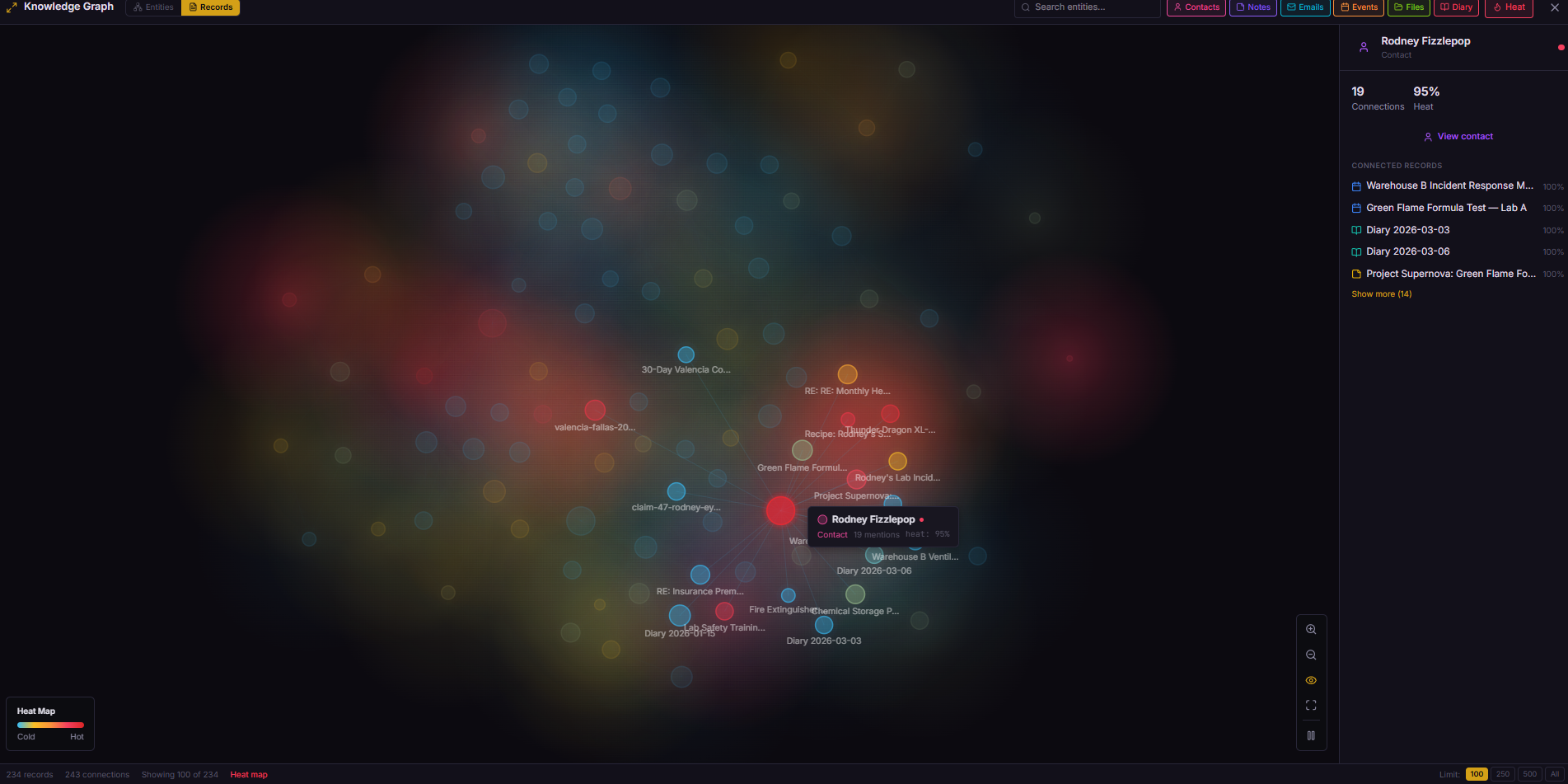
Records aren’t the only thing with heat. Graph edges — the connections between entities in the knowledge graph — also have a heat score.
When you open a note and then immediately open a related email (within 60 seconds), the edge between those two records gets warmer. The dashboard tracks these co-navigation patterns automatically:
if (lastViewedRecord && Date.now() - lastViewedRecord.timestamp < 60_000) {
  api.post('/links/heat-edge', {
    from_type: lastViewedRecord.type,
    from_id: lastViewedRecord.id,
    to_type: currentRecord.type,
    to_id: currentRecord.id
  });
}
Hot edges become visible in the graph visualization — glowing connections between frequently co-accessed records. Cold edges fade almost invisible. It turns the knowledge graph into a heat map of your actual workflow, not just a static web of extracted entities.
What I’d do differently
I’d start with simpler thresholds and tune later. We went through three iterations of tier boundaries (the original design had unbounded scores with thresholds at 5.0 and 0.5, then we normalized to 0-1 with a soft cap, then adjusted thresholds to 0.7/0.2). Starting with “anything accessed in the last week is hot, anything in the last month is warm, everything else is cold” would have been fine for v1.
I’d add heat to the search provenance from day one. Heat was initially invisible in search results — you could feel its effect on ranking but couldn’t see the raw score. Adding provenance (the breakdown of all four search signals) happened later, and it was immediately obvious it should have been there from the start. Transparency in ranking builds trust.
The takeaway
Heat scoring is maybe 150 lines of code: one table, one upsert function, one cron job, one post-fusion multiplier. But it fundamentally changes the system’s relationship with time.
Without heat, every record is equally present. Your database is a flat archive — 2,000 notes, all with the same weight. With heat, the database has a sense of “now.” Recent activity floats to the surface. Old activity sinks naturally. The AI agent, the search engine, and the digest all benefit from the same signal: what matters to you right now.
The formula doesn’t need to be clever. Exponential decay with a weekly half-life and a soft cap. That’s it. The cleverness is in where you apply it — as a tiebreaker in search, as a filter in the agent’s queries, as a priority signal in the digest, as a visual indicator in the dashboard.
Data that knows how to forget is data that stays useful.
Next up: from JSON to compact — how we reduced API payloads by 60% for LLM consumption, and why your AI agent is wasting most of its tokens on field names.