The irritating part of coming back to work is not always the work. It is reconstructing what happened while you were away. A note changed. Somebody added an appointment. Two references appeared. None of those things deserves a separate interruption, but together they might change what you do first.
We want the box to remember those changes without demanding that we watch it remembering them. Then, when we come back, there should be a place to catch up. Not a promise that an agent has finished our job. A short briefing that helps us find the next piece of it.
This is a walkthrough of that part of Micelclaw: the activity digest, its history, and its quiet hours. It is related to our background AI work, but it is not the same subsystem as the sleep-time engine. That distinction matters. A digest can run during the day as well as at night; the background engine has its own conditions for running.
Everything in the Harbor Lights example is fictional demonstration data. We created it in our test user’s account and ran the real digest cycle during the day. The source-note and settings screenshots show the real product. The digest illustration is an editorial English rendering of the actual Spanish output, labeled as a translation—not native English product output or a mock-up of an overnight run. Its meaning and limitations are preserved.
Six small changes, not six alarms
Harbor Lights is an invented community event. Its story is deliberately ordinary: venue access is confirmed, a supplier quote needs review, a rain plan is ready, and the crew has a briefing in the calendar. Two saved links point to reference material. There is no real customer, booking, weather forecast, or purchase behind any of it.
We added three notes, one calendar appointment, and two bookmarks. That is six new records across three modules. We did not add fake emails to a connected mailbox or send invitations to make the screen look busy. The bookmarks use example.com addresses; they are placeholders, not documents we claim to have fetched.
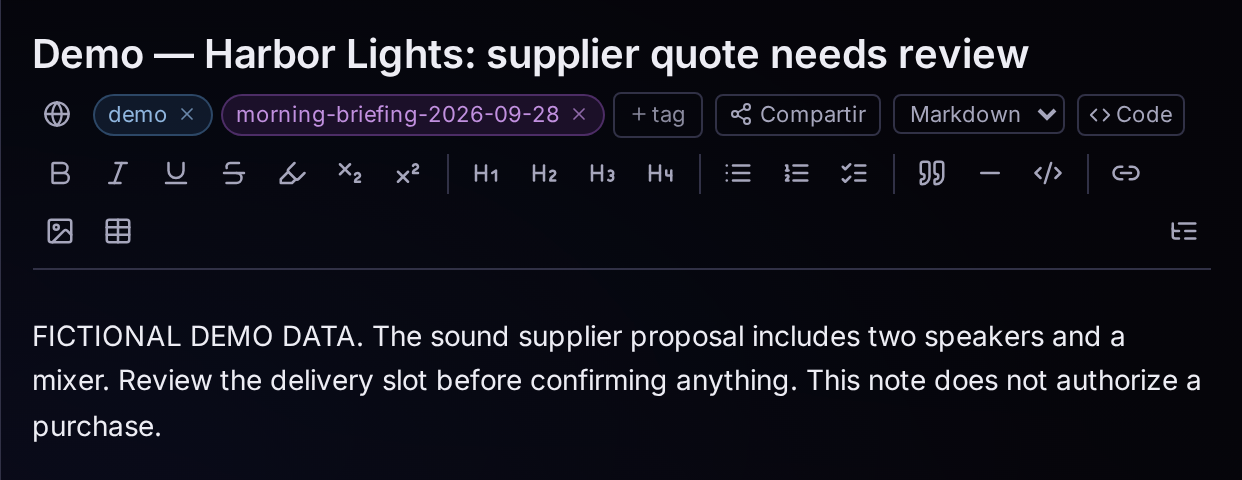
The supplier note is a useful example of the difference between information and action. Its title says the quote needs review. Its body says to check the delivery slot before confirming anything, and explicitly says that the note does not authorize a purchase. That is the job we want to return to. Not an assistant deciding that the order must already have been placed.
All three notes follow the same pattern: a short, useful title and a body that explains the situation. We make the demonstration label visible both in the title and in the content. It is possible to prepare an attractive product example without passing invented business activity off as a real customer’s data.
The calendar entry adds a specific time for the crew briefing. The two bookmarks provide somewhere to put references. Those records stay in their respective modules. Creating a digest does not turn them into a new project or merge their contents into one document. It creates a separate view of what changed.
One place to catch up
After the records were created, the real change log contained all six of their identifiers. We then ran the digest cycle. The resulting history entry reports six changes, with Notes, Events, and Bookmarks shown beneath the summary.
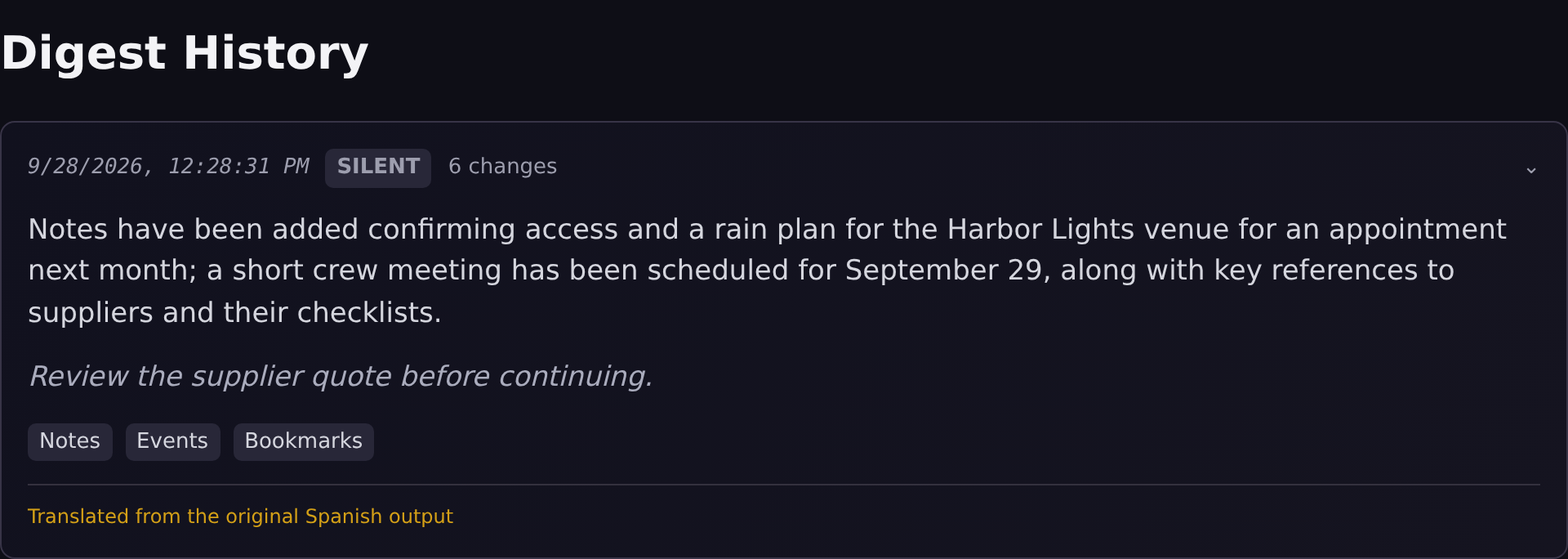
The card shows a delivery time, an alert level, the number of changes, a generated summary, and a suggested next step when one is available. In this demonstration the alert level is SILENT. That is the system’s classification for this batch; we did not create an emergency just to get a more dramatic badge.
The suggested action is to review the supplier quote before continuing. That is useful because it gives us a starting point when we return. It does not review the quote, approve it, or send anything to the supplier. A suggestion is still a suggestion, and it should look different from completed work.
This is also why we like keeping the history separate from the notification itself. A notification is a moment: you may see it or miss it. A history entry is something you can come back to. The existence of the briefing should not depend on whether you were watching a toast when it appeared.
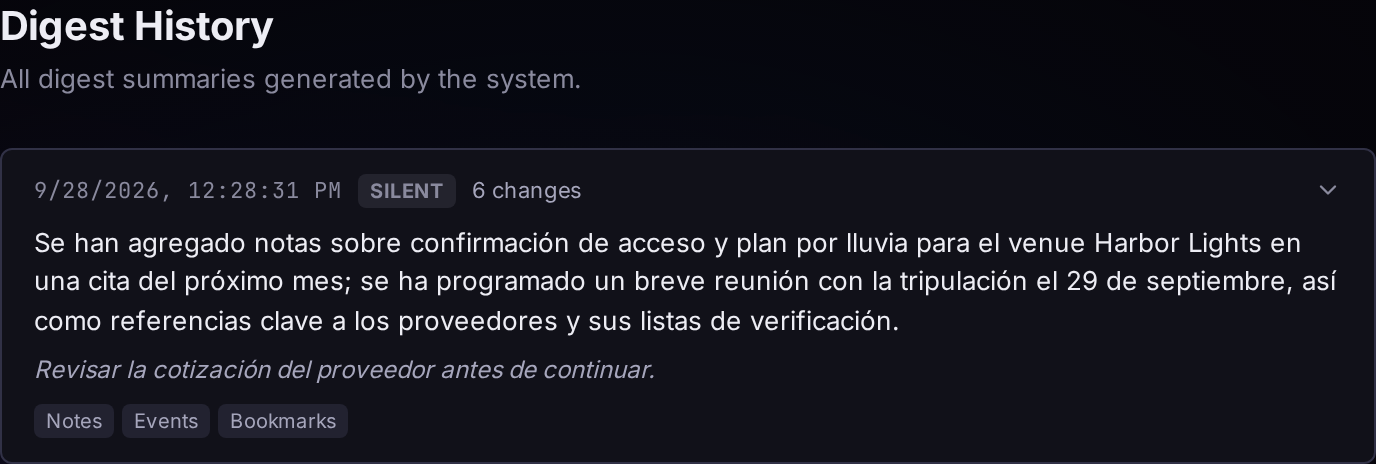
The AI output in this build is Spanish, while the surrounding interface is English. For this English-language article, we translated the summary and suggested action and rendered a labeled editorial illustration. We preserved the timestamp, change count, alert level, domains, and the date error discussed below. This is not a localization fix: the product output and stored records remain unchanged. You can also view the original Spanish capture.
Let the box work without waking you
The Digest settings separate how frequently a briefing is compiled from when routine alerts should reach you. The frequency control is about generation. Quiet hours are about delivery. Turning down interruptions should not have to mean losing the information.
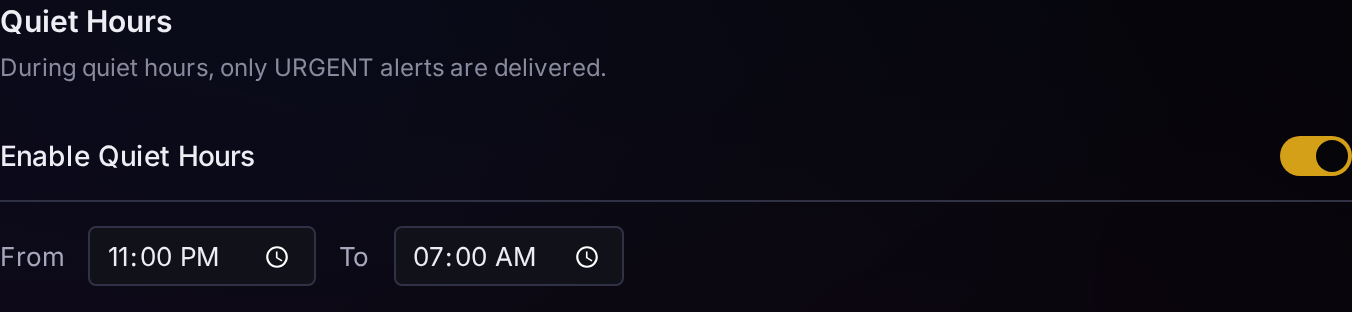
Here the quiet-hours example runs from 23:00 to 07:00. The screen states the important exception: only URGENT alerts are delivered during that window. It is not an absolute mute switch. If you want to understand what the setting promises, that exception belongs in the explanation, not in tiny print after a claim of perfect silence.
For the generated batch shown above, we used a temporary quiet window covering the demonstration time. The real history entry records its delivery as history_only. In other words, the routine briefing was retained without being delivered as a Dash alert. We then restored the test user’s original settings. The overnight window in this screenshot is a separate, real configuration example that we also restored after capturing it.
We did not change the computer’s clock or backdate a briefing to make this feel like a morning. The useful thing to demonstrate is the behavior: information can accumulate and remain available without every routine update becoming an interruption. The time on the card is the time the demonstration actually ran.
If you return after a few hours rather than a full night’s sleep, the same idea applies. You do not need to have been asleep for a digest to be useful. “While you sleep” describes one everyday use for background work; it is not the only time the system is allowed to remember a change.
The summary is not the source
There is a reason we show an original record as well as the briefing. Summarization is not a substitute for the facts it summarizes. In this very example, the AI wording refers to “next month,” even though the crew appointment is on 29 September and the demonstration ran on 28 September. The wording is wrong. The actual appointment wins.
We could have corrected that sentence while translating it. Instead, the English illustration retains “next month” and we explain the boundary. The summary can orient us toward the supplier quote; it cannot become the authority for an appointment’s date. Before acting on a date, amount, or commitment, open and check the original record in its module.
This does not make the briefing useless. It makes its role smaller and clearer. It is a place to regain context, not a certification that every generated sentence is correct. The useful output here is the grouping and the prompt to review an unfinished decision. It is not a claim that the model understands the entire event or has verified its logistics.
That is the distinction we want the interface to preserve as the feature develops: collected changes, generated interpretation, and user decisions are three different things. Putting them on one screen should not blur them into a single claim of completed work.
What it does not do yet
During this preparation, the expanded change-details request returned a server error in our local build. The briefing itself loaded and was generated from real changes, but the drill-down did not work in that check. We are not illustrating a working click-through from that list or claiming the problem is fixed. For this walkthrough we opened the original note directly in Notes.
Telegram delivery for this digest is still a placeholder in the inspected implementation. Email delivery is a separate configured path; we did not enable or test it here. There is no reason to turn either into an announcement of a tested feature merely because a channel option appears in settings.
The sleep-time engine is separate from this digest demonstration. It checks for eligible, idle users and performs background jobs such as enrichment and summary work. The six new records do not establish that it learned a habit, detected an anomaly, or completed an overnight research task. We have not fabricated weeks of historical activity to make those claims.
Finally, this walkthrough does not demonstrate a message sent, a purchase made, a calendar invitation delivered, or a task completed by the assistant. The real operation we verified is narrower: changes were recorded, a briefing was generated, and routine delivery was suppressed during quiet hours while its history was retained.
The takeaway
We want to come back to a useful starting point, not to six unrelated alarms. This example gives us that starting point: six small changes, one place to catch up, and a clear boundary between the briefing and the source.
The computer can keep the thread while we are away. We still decide what to do with it when we return.
Next in Module Tours: Mail — reading a thread, finding its context, and drafting the next message without pretending it has already been sent.